Obfuscated VPNs and Stealth Protocols, Compared (2026)
An obfuscated VPN wraps or reshapes VPN traffic so a network filter can't easily tell it is a VPN. You need one only when a network actively blocks VPNs: some campus, office and hotel Wi-Fi, or a country that filters traffic. Everywhere else it just costs speed. The useful modes in 2026 are NordVPN's NordWhisper, Proton VPN's Stealth, Mullvad's anti-censorship options, Windscribe's Stealth and WStunnel, and Surfshark's obfuscated servers.
This guide explains how filters recognise VPN traffic, then compares each provider's mode by what it wraps, where it runs and what it switches off. Every claim is from the provider's own documentation, read on 9 and 10 October 2026. We didn't test these modes against a real censor, and nobody can promise one will keep working.
What obfuscation does (and doesn't)
Obfuscation hides the fact that you are using a VPN. It does not add encryption: your VPN tunnel is already encrypted. What it changes is the shape of the traffic, so the patterns a filter looks for are hidden or missing.
That distinction matters for three reasons. First, obfuscation adds nothing to your privacy on an open network. Second, it usually costs speed, because the extra wrapping adds bytes and sometimes forces TCP. Third, it changes how the traffic looks, not what the law says. In a country that restricts VPNs, a disguised VPN is still a VPN.
The provider marketing language around this is loose. 'Stealth', 'obfuscated servers', 'camouflage' and 'no borders' are product names, not technical terms. The real questions are what the mode wraps your tunnel in, which apps offer it, and what it turns off.
How DPI spots a VPN
Deep packet inspection (DPI) means looking past the address and port at the contents and rhythm of the packets. A filter doesn't need to break your encryption to find a VPN. It only needs to recognise the parts that aren't encrypted, or a pattern of sizes and timing.
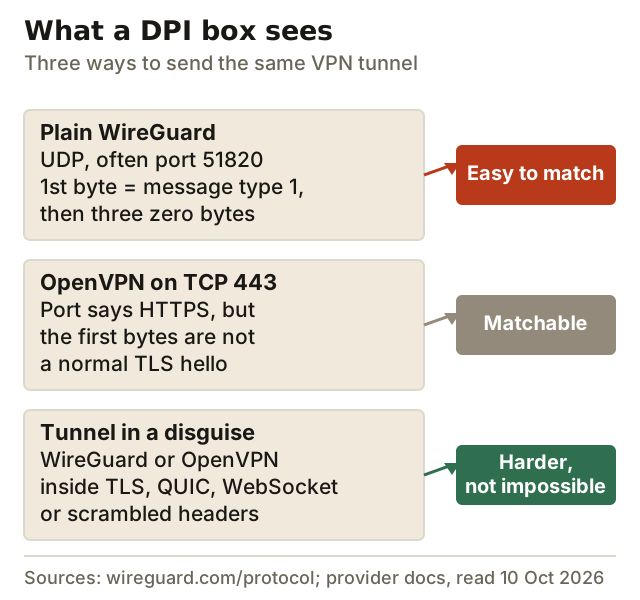
Plain WireGuard is the easiest to spot. WireGuard's protocol documentation shows that every message starts with a type byte (1 for a handshake initiation, 2 for a response, 4 for data), followed by three zero bytes. By that field layout the first handshake message has a fixed size of 148 bytes. It travels over UDP, often on port 51820 by convention. That makes a cheap and reliable fingerprint.
OpenVPN on TCP 443 borrows the HTTPS port, which is why it was the classic workaround. But port numbers are only labels. OpenVPN wraps its own TLS handshake in its own packet format, so the first bytes on the wire don't look like a browser's TLS hello. A filter that checks the first few bytes of a connection on port 443 can still single it out.
A wrapped tunnel puts the VPN inside something that is common on the web: a real TLS session, QUIC (the transport HTTP/3 uses), a WebSocket, or a Shadowsocks stream. Mullvad's newer method, LWO, takes a different route: it scrambles the header of every WireGuard packet so the fixed pattern disappears. None of these is invisible. A determined censor can still look at traffic volume, timing and destination IPs. But each one raises the cost of blocking you.
Censors also block by destination. If a VPN server's IP address is publicly known, a firewall can block it without inspecting a single packet. That is why the better stealth modes come with special server pools and why providers rotate addresses.
The obfuscation matrix: NordVPN, Proton, Surfshark, ExpressVPN, Mullvad, Windscribe
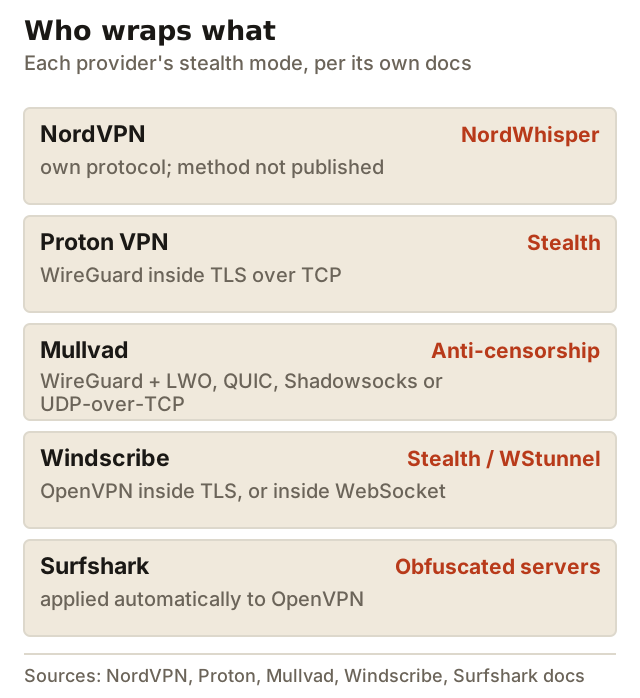
| Provider | Mode | What it wraps | Apps (per provider) | Known conflicts |
|---|---|---|---|---|
| NordVPN | NordWhisper; obfuscated servers now run on it | Not published | Windows, Android, Linux, iOS, macOS (+ Android TV steps) | No dedicated IP, Meshnet or Onion Over VPN; post-quantum off on obfuscated servers |
| Proton VPN | Stealth (all plans, incl. Free) | WireGuard in TLS over TCP | Android, Windows, macOS, iOS; Linux GUI | Not in the Linux Snap package |
| Mullvad | Anti-censorship: LWO, QUIC, Shadowsocks, UDP-over-TCP | WireGuard | Desktop and mobile apps; LWO on iOS since April 2026 | None documented; port can be changed |
| Windscribe | Stealth; WStunnel | OpenVPN in TLS (Stunnel); OpenVPN in WebSocket | Its apps, via manual connection mode | Windscribe calls both last resorts |
| Surfshark | Obfuscated servers; NoBorders | OpenVPN (automatic when selected) | OpenVPN apps: Android, macOS, Windows, iOS, Linux | Obfuscation is OpenVPN-only, so no WireGuard post-quantum |
| ExpressVPN | No separate mode documented | Not documented | - | We found no ExpressVPN page describing obfuscation |
NordVPN: NordWhisper and obfuscated servers
NordVPN describes NordWhisper as a protocol 'designed to overcome restrictive local network environments', and lists it on Windows, Android, Linux, iOS and macOS. Its support pages give Android TV setup steps too. The important 2026 change is that NordVPN's obfuscated servers category now runs on NordWhisper instead of OpenVPN. That means those servers are no longer reachable through a manual OpenVPN setup, so many older guides are out of date.
NordVPN's troubleshooting article for restrictive countries says obfuscated servers appear only when the protocol is set to Auto or NordWhisper. It lists four things to try: NordWhisper, obfuscated servers, OpenVPN over TCP and a manual IKEv2 connection. NordWhisper won't work with a dedicated IP, Meshnet or Onion Over VPN. NordVPN's post-quantum option is also disabled on obfuscated servers, so you trade one protection for the other. NordVPN doesn't publish how NordWhisper disguises traffic, and it makes no country-specific promise for it.
If NordVPN is the provider you'd pick anyway, NordVPN puts NordWhisper in the protocol menu of its main apps.
Affiliate link. We may earn a commission — it never moves a ranking.
Proton VPN: Stealth
Proton describes Stealth as its own obfuscation protocol, built on WireGuard tunnelled over TLS. It launched on 6 October 2022 and is available on every Proton plan, including Free. That is the best free option here, though Proton Free has only one device and server countries Proton assigns automatically. Proton's own wording is hedged, and we keep the hedge: it says Stealth can bypass 'most' firewalls and VPN blocks.
Proton's 2022 announcement lists Android, Windows, macOS and iOS, plus the Linux GUI app once Proton's own protocols are enabled. Its Linux page warns that the Snap package lacks Stealth. We found no documented conflict between Stealth and split tunnelling. On macOS, Proton says split tunnelling works with WireGuard and Stealth but not IKEv2. Proton VPN is the one to try first if you need stealth on a free plan.
Affiliate link. We may earn a commission — it never moves a ranking.
Mullvad: four anti-censorship methods
Mullvad isn't one of our affiliate partners, and its approach is the most transparent of the group. Its apps can wrap WireGuard four ways. UDP-over-TCP works on networks that allow only TCP. WireGuard over Shadowsocks was added in September 2024, QUIC in August 2025 and LWO, its lightweight header scrambling, in October 2025. On automatic, the app tries these when a normal connection fails. LWO reached the iOS app last, in version 2026.2 (21 April 2026), per Mullvad's iOS changelog.
Mullvad also lets you choose the WireGuard port and the ports for UDP-over-TCP and LWO. That helps on networks that allow only a few ports. Since 15 January 2026 Mullvad has been WireGuard-only, so every one of its stealth options wraps WireGuard.
Windscribe: Stealth and WStunnel
Windscribe, another provider with no affiliate link here, offers two wrapped modes. Stealth wraps an OpenVPN connection in a TLS tunnel using Stunnel. WStunnel wraps OpenVPN in a WebSocket. Windscribe's own feature page says to use either only if all other methods fail, and that they may help on restrictive school or office networks and in countries such as China, Russia, the UAE and Iran. You pick them as the protocol in the app's connection settings.
Surfshark: obfuscation on OpenVPN, plus NoBorders
Surfshark's support page says that whenever you use OpenVPN in its apps, you are on obfuscated servers. Its current pages don't use the old 'Camouflage mode' name. NoBorders is a separate feature. Surfshark says it switches on automatically when the app detects a restricted network, and it narrows your server list to ones that work under restrictions. The trade-off is that obfuscation lives on OpenVPN, while Surfshark's post-quantum protection lives on WireGuard. Surfshark suits you if you want the obfuscation to switch on by itself.
Affiliate link. We may earn a commission — it never moves a ranking.
ExpressVPN: nothing documented
Many reviews say ExpressVPN obfuscates all its servers automatically. We couldn't find an ExpressVPN support or product page that says so, so it isn't in our matrix as a feature. If ExpressVPN publishes documentation, we'll add it.
Affiliate link. We may earn a commission — it never moves a ranking.
Trade-offs: speed, platforms, feature conflicts
Expect stealth modes to be slower than plain WireGuard. Wrapping in TLS or WebSocket adds bytes to every packet, and modes that run over TCP can hit the TCP-over-TCP slowdown on lossy networks. We haven't measured these modes, and providers don't publish comparable figures, so we won't put a percentage on it. Mullvad says LWO adds very little overhead, which is the point of its design. Our TCP vs UDP guide explains why TCP-based modes slow down on bad connections.
Platform coverage is the second trade-off. Stealth modes usually arrive on Windows and Android first, and iOS lags. Routers rarely get them, because a router runs plain WireGuard or OpenVPN from its own firmware. If you need stealth on a TV or games console, you're usually stuck: those devices can't run the provider's app.
The third trade-off is features. Check the conflicts column before you rely on a mode:
- NordVPN: no post-quantum, dedicated IP, Meshnet or Onion Over VPN while you are on NordWhisper or its obfuscated servers.
- Surfshark: obfuscation needs OpenVPN, so you give up WireGuard and its post-quantum layer.
- Proton: the Snap build on Linux has no Stealth; use the native package.
- Mullvad: LWO arrived on iOS only in April 2026, so update an older iPhone app before you look for it.
When you need it (and the legal caveat)
Use a stealth mode when a normal connection fails or stalls on a particular network. Common cases are university and school Wi-Fi, office guest networks, some hotels and airlines, and a handful of countries that filter VPN traffic. If your VPN connects normally, leave it off. You'll get better speed from plain WireGuard. Our WireGuard vs OpenVPN comparison covers that default. For every protocol side by side, see VPN protocols compared.
A simple order of attempts works on most networks: the app's automatic or stealth mode first, then OpenVPN over TCP on port 443 if it is offered, then a different server or country. If none of these works, the network may be blocking by destination IP, and only the provider can fix that by adding new servers.
The legal caveat matters. Obfuscation makes a VPN harder to detect. It does not make it legal where VPNs are restricted, and in some countries using an unapproved VPN carries real penalties. Check the law where you are before relying on a stealth mode. Get proper advice if the stakes are high; this page is a technical guide, not legal advice.
How to tell a network is blocking your VPN
A blocked VPN and a broken VPN look alike at first, so check before you reach for stealth. Signs that point to a block rather than a fault:
- The app sits on 'connecting' on one network but connects at once on mobile data or at home.
- Ordinary websites load fine, but every VPN server and protocol fails on that network.
- The connection succeeds for a few seconds, then drops, over and over. Some filters let the handshake through and then cut the flow.
- The provider's own website won't load on that network either, which suggests a list-based block.
If the VPN fails on every network, the problem is more likely your account, the app or the device. Reinstall or contact support before you blame a firewall. If it fails on only one network, that is the case stealth modes are built for. Try them in the order above and note which one works, because the same network usually behaves the same way next time.
Edge cases
- Workplace networks: bypassing your employer's or school's VPN block may break their acceptable-use rules, even where it's legal. That is a policy risk, not a technical one.
- Captive portals: connect to the hotel or airport login page first, then start the VPN. Stealth modes can't pass a login page.
- Manual configs: most stealth modes exist only inside the provider's app. A downloaded WireGuard or OpenVPN file is the plain, easy-to-spot version.
- Speed tests lie here: a stealth mode that tests slower at home may be the only thing that connects at all on the blocked network. Judge it there.
Obfuscated VPN: common questions
What is an obfuscated VPN?
Should I use NordVPN obfuscated servers all the time?
What is Proton VPN's Stealth protocol?
Is a stealth VPN slower?
Is using an obfuscated VPN legal?
Still deciding? Compare the options in our guide to the best VPN protocols and when to use each, or read the head-to-head on WireGuard vs OpenVPN.