VPN Ports: Which Port Every VPN Protocol Uses (2026)
Each VPN protocol uses its own ports. WireGuard conventionally uses UDP 51820, OpenVPN uses UDP 1194 or TCP 443, IKEv2 uses UDP 500 and 4500, and SSTP uses TCP 443. The legacy pair are PPTP on TCP 1723 and L2TP on UDP 1701. For an ordinary VPN app you don't need to open any of them on your home router, because outgoing connections are allowed by default. Ports matter when you run your own VPN server, or when a network blocks you.
Below is the reference table with a source for every entry, a note on each protocol, what commercial providers change, and a short plan for networks that block VPNs.
The port table
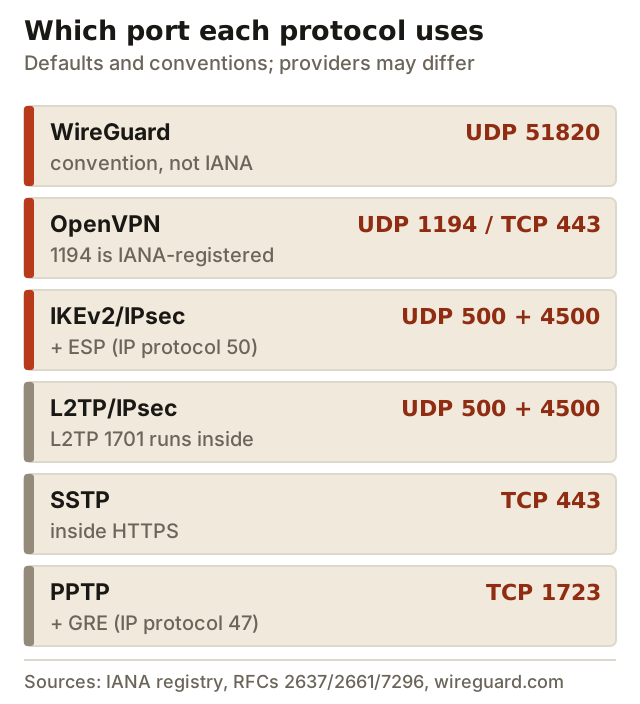
| Protocol | Port(s) | Transport | Source | Notes |
|---|---|---|---|---|
| WireGuard | 51820 (convention) | UDP | wireguard.com examples; IANA has no assignment | Any port works; set in ListenPort |
| OpenVPN | 1194 | UDP or TCP | IANA registry ('openvpn') | Apps often use TCP 443 to look like HTTPS |
| IKEv2/IPsec | 500 and 4500 | UDP (+ ESP, IP protocol 50) | RFC 7296; RFC 3948 | 4500 is used when NAT is in the path |
| L2TP/IPsec | 500 and 4500; 1701 inside | UDP (+ ESP) | RFC 2661; RFC 3193 | L2TP alone has no encryption |
| SSTP | 443 | TCP (HTTPS) | Microsoft MS-SSTP spec | Windows-native |
| PPTP | 1723 + GRE | TCP + IP protocol 47 | RFC 2637 | Insecure; do not use |
A note on protocol numbers: GRE (47) and ESP (50) are IP protocol numbers, not ports. A firewall rule for them says 'allow protocol 50', not 'allow port 50'. Mixing the two up is the most common reason an IPsec or PPTP rule doesn't work.
WireGuard: UDP 51820 (and why providers change it)
WireGuard has no fixed port. You choose it with the ListenPort setting, and if you leave it out the system picks one. Port 51820 comes from WireGuard's own example configuration and has become the convention. IANA, the body that registers port numbers, has not assigned it: 51820 falls in the dynamic range from 49152 to 65535, which is never assigned.
WireGuard runs only over UDP. Because 51820 is so widely known, it's also an easy number for a firewall rule to block. That's why some providers let you change the port. Mullvad's apps let you set the WireGuard port, and Windscribe lists 15 connection ports across its protocols, from 21 and 53 to 443 and 65142. NordVPN lists NordLynx, its WireGuard-based protocol, on UDP 51820. If you self-host, choosing a less obvious UDP port costs nothing and dodges the laziest blocks.
OpenVPN: UDP 1194 / TCP 443
OpenVPN's registered port is 1194, for both UDP and TCP, in the IANA registry, with James Yonan, OpenVPN's creator, as the assignee. UDP 1194 is the default. In practice commercial apps also run OpenVPN on TCP 443, the port HTTPS uses, because few networks can block it without breaking the web.
NordVPN's support page lists the ports its servers use: OpenVPN TCP on 443 and 1231 to 1234, and OpenVPN UDP on 1194 and 1231 to 1234. TCP 443 is the useful fallback, but it's slower on poor connections, as our TCP vs UDP guide explains. Note too that a deep-packet-inspection filter can tell OpenVPN from real HTTPS even on port 443. The OpenVPN explainer covers the rest of the protocol.
IKEv2/IPsec: UDP 500, 4500 and ESP
IKEv2 (RFC 7296) does its key exchange on UDP port 500. When a NAT router sits in the path, which is nearly always the case at home or on mobile data, it switches to UDP 4500 and wraps the encrypted traffic in UDP (RFC 3948). Without NAT, the encrypted data travels as ESP, IP protocol 50. A firewall that should pass IKEv2 therefore needs UDP 500, UDP 4500 and, for non-NAT cases, protocol 50.
Those fixed ports are IKEv2's weakness on restrictive networks. Windscribe's own protocol page puts it bluntly: IKEv2 is 'usually one of the fastest protocols, but it can easily be blocked'. NordVPN lists IKEv2 on UDP 500 and 4500. Our IKEv2 guide explains when it's still the right choice.
Legacy: PPTP 1723, L2TP 1701
PPTP opens a control connection on TCP 1723 (RFC 2637) and carries its data in GRE, IP protocol 47. Some home routers and NAT devices pass GRE poorly, which can make a PPTP connection log in and then carry no data. PPTP's security is broken anyway, so the right fix is to replace it, not to open more ports.
L2TP uses UDP 1701 (RFC 2661), but in real-world L2TP/IPsec that port travels inside the IPsec tunnel. What the firewall actually sees is UDP 500, UDP 4500 and ESP, the same as IKEv2. If you need to allow L2TP/IPsec through a firewall, open the IPsec ports. Opening 1701 to the internet on its own exposes an unencrypted service.
On a network that blocks VPNs
A blocking network usually allows only a few outgoing ports, typically 80 and 443, or it inspects traffic to find VPNs. The order below works on most hotel, campus and office networks.
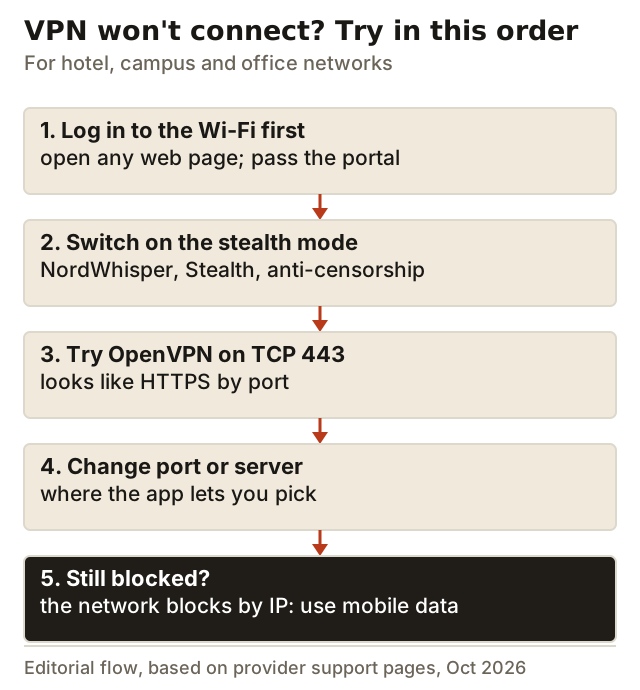
Two settings make the biggest difference. The first is a stealth mode, such as NordVPN's NordWhisper, Proton VPN's Stealth or Mullvad's anti-censorship options, because port changes alone don't defeat inspection. The second is a port choice where the app offers one. Windscribe lets you pick the protocol and port. Mullvad lets you set the WireGuard port and run UDP-over-TCP on port 443. PIA's desktop app lets you choose OpenVPN's remote port.
NordVPN's apps don't offer a port picker. Its servers use the fixed ports listed above, and its obfuscated servers now run on NordWhisper. If you're choosing a provider for networks like these, NordVPN relies on NordWhisper rather than port choice, while Mullvad and Windscribe, which pay us nothing, give you manual port control. Our protocol guide compares the rest.
Hosting your own VPN: what to open on the firewall
If you run a VPN server at home or on a cloud machine, open only the inbound ports that server needs and forward them to that one machine. Per protocol:
- WireGuard: one UDP port, the ListenPort in your config. Forward it to the server. Nothing else is needed, because WireGuard ignores packets that aren't from a known key.
- OpenVPN: the port and transport in your server config, usually UDP 1194. If you also offer TCP 443 for blocked networks, the server can't share that port with a web server on the same IP unless you set up port sharing.
- IKEv2/IPsec: UDP 500 and UDP 4500. Allow ESP (protocol 50) as well if clients may connect without NAT in the path.
- SSTP: TCP 443 to the Windows server, with a valid certificate for the hostname clients use.
Leave PPTP's TCP 1723 and GRE closed, and never expose L2TP's UDP 1701 on its own. On a cloud server, remember there are two firewalls, the provider's security group and the operating system's own, and both need the rule. When a new server 'doesn't work', the missing rule on one of those two layers is the usual reason.
Port forwarding is a different thing
Searches for 'VPN port' often mix up two ideas. The ports above are where your device connects to the VPN server. Port forwarding is the reverse: it lets someone on the internet reach a service on your device through the VPN server, which matters for some games, torrent clients and home servers. Many providers don't offer it. NordVPN says it doesn't offer port forwarding. If you need incoming connections, check a provider's support pages for port forwarding before you buy.
Edge cases
- Your home router: a VPN app needs no open inbound ports. Only open ports if you host a VPN server at home, and then open only that server's port.
- Double NAT and CGNAT: if your ISP shares one public IP among many customers, inbound ports may not reach you at all. A home WireGuard server then needs a relay or an ISP option for a public IP.
- UDP-hostile networks: some networks drop most UDP. WireGuard can't switch to TCP by itself, so you need a wrapper such as Mullvad's UDP-over-TCP, or OpenVPN TCP 443.
- ESP through NAT: if IKEv2 connects but no traffic flows, the network is probably dropping protocol 50 or UDP 4500.
VPN ports: common questions
What port does a VPN use?
Is 51820 the official WireGuard port?
What is the default OpenVPN port?
Which ports do I need to open for a VPN?
Can I change the port my VPN uses?
Still deciding? Compare the options in our guide to the best VPN protocols and when to use each, or read the head-to-head on WireGuard vs OpenVPN.